Keyboard Navigation
The Zer0-Mistakes theme includes comprehensive keyboard navigation support to enhance accessibility and improve navigation efficiency for all users.
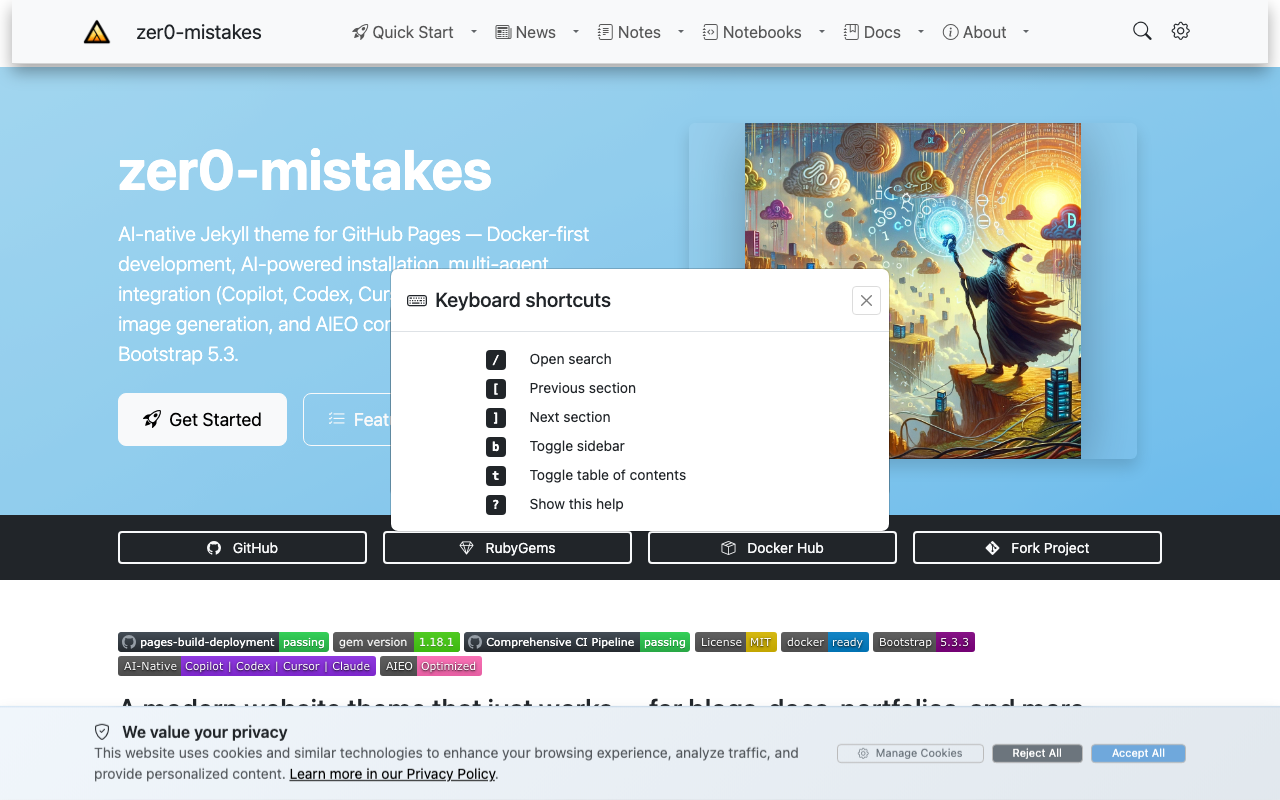
Press ? on any page to open this shortcuts reference.
Quick Reference
| Shortcut | Action | Context |
|---|---|---|
Tab / Shift+Tab |
Navigate forward/backward through links | Anywhere |
Enter / Space |
Activate link or button | On focusable element |
[ |
Navigate to previous section | Table of Contents |
] |
Navigate to next section | Table of Contents |
Esc |
Close offcanvas sidebar | When sidebar is open |
/ |
Focus search (future) | Anywhere |
Skip Navigation
Skip to Main Content
Press Tab immediately after page load to reveal the "Skip to main content" link. This allows keyboard users to bypass the navigation menu and jump directly to the page content.
How it works:
- Page loads
- Press
Tabonce - "Skip to main content" button appears
- Press
Enterto jump to main content
Sidebar Navigation
Left Sidebar
The left sidebar provides site-wide navigation and can be controlled via keyboard:
- Open on mobile: Tab to the menu button, press
Enter - Navigate items: Use
Tabto move through links - Expand categories: Press
Enteron category buttons - Close: Press
Esc
Right Sidebar (Table of Contents)
The table of contents sidebar includes advanced keyboard navigation:
Section Navigation
- Previous section: Press
[to scroll to the previous heading - Next section: Press
]to scroll to the next heading - Direct selection: Tab through TOC links and press
Enter
Mobile Access
On mobile devices:
- The TOC button appears in the bottom-right corner
- Tab to the button or swipe from the right edge
- Press
Enterto open - Navigate with
Tab, close withEsc
Focus Management
The theme automatically manages focus to provide a smooth keyboard experience:
Offcanvas Focus Trap
When a sidebar opens:
- Focus moves inside the offcanvas panel
Tabcycles through elements within the panelEsccloses the panel and returns focus to the trigger button
Anchor Links
When clicking TOC links:
- Page scrolls to the target heading
- Focus moves to the heading for continued keyboard navigation
- URL updates without page reload
Accessibility Features
Screen Reader Support
- All interactive elements have descriptive ARIA labels
- Navigation landmarks clearly defined
- Skip links for efficient navigation
- Focus indicators visible at all times
Visual Focus Indicators
- High contrast focus outlines on all interactive elements
- Active section highlighting in TOC
- Current page indication in navigation
- Hover states for better visibility
Reduced Motion
The theme respects the prefers-reduced-motion system setting:
- Smooth scrolling disabled when requested
- Transition animations minimized
- Page changes instant instead of animated
Touch and Swipe Gestures
On touch devices, additional gesture controls are available:
Swipe to Open
- Swipe right from left edge: Opens left sidebar
- Swipe left from right edge: Opens table of contents
Touch Targets
All interactive elements meet minimum touch target size requirements (44x44px) for better accessibility.
Browser Support
Keyboard navigation features work in:
- Chrome/Edge 58+
- Firefox 55+
- Safari 12.1+
- All modern mobile browsers
Troubleshooting
Focus Not Visible
If you don't see focus indicators:
- Check browser settings for "Tab highlighting"
- Ensure custom CSS hasn't overridden
:focusstyles - Try a different browser
Shortcuts Not Working
If keyboard shortcuts don't respond:
- Make sure JavaScript is enabled
- Check browser console for errors
- Verify you're not typing in a form field
- Try refreshing the page
Screen Reader Issues
For screen reader problems:
- Ensure latest screen reader version
- Check ARIA support in your browser
- Review WCAG 2.1 guidelines
Feedback
Have suggestions for improving keyboard navigation? Open an issue or contribute to our accessibility improvements.
This guide follows WCAG 2.1 Level AA accessibility standards.
Technical Reference
For implementation details (WCAG 2.1 AA compliance, ARIA attributes, keyboard event handling, focus management):
See also
- [[Features]]
- [[Skip-to-Content Accessibility Link]]
- [[Sidebar Navigation System]]