Giscus Comments
Add a GitHub Discussions-powered comment system to your Jekyll site with automatic theme detection and privacy-friendly design.
Overview
Giscus is a comments system powered by GitHub Discussions. Unlike traditional services like Disqus, Giscus:
- Requires no database — comments are stored in GitHub Discussions
- Respects privacy — no tracking, no ads
- Supports reactions — GitHub emoji reactions on comments
- Auto theme detection — matches your site's light/dark mode
- Free and open source — MIT licensed
Prerequisites
Before setting up Giscus, ensure you have:
- A public GitHub repository for your Jekyll site
- GitHub Discussions enabled on the repository
- The Giscus app installed on your repository
Installation
Step 1: Enable GitHub Discussions
- Go to your repository on GitHub
- Navigate to Settings → General
- Scroll to Features section
- Check Discussions
Step 2: Install Giscus App
This is the step most likely to be silently skipped — nothing in your repository can declare it, and no test or build can detect that it's missing. Without it the widget renders an error instead of a comment box, no matter how correct _config.yml is.
- Visit https://github.com/apps/giscus
- Click Install (or Configure, if you've installed it on another account before)
- Select the account that owns the repository
- Grant access — either All repositories or Only select repositories including this one
- Verify it took effect:
Forking this theme? A fork does not inherit the upstream repo's app installation, and the
data-repo-id/data-category-idin_config.ymlstill point atbamr87/zer0-mistakes. You must install the app on your own repo and regenerate both IDs.
Step 3: Get Configuration Values
- Visit https://giscus.app/
- Enter your repository name (e.g.,
username/repo-name) - Select your preferred settings:
- Page ↔ Discussions Mapping:
pathname(recommended) - Discussion Category: Choose or create a category like "Comments"
- Features: Enable reactions, lazy loading as desired
- Copy the
data-repo-idanddata-category-idvalues
Step 4: Configure Jekyll
Add the Giscus configuration to your _config.yml. The theme reads exactly three keys — enabled, data-repo-id, and data-category-id:
# Giscus Comment System Configuration
giscus:
  enabled: true
  data-repo-id: "YOUR_REPO_ID"
  data-category-id: "YOUR_CATEGORY_ID"
The data-repo value is filled in automatically from site.repository (set near the top of _config.yml), so you don't repeat the owner/repo here.
Verify it works
The comment section renders at the bottom of the article, note, and notebook layouts, gated consistently on page.comments != false and site.giscus.enabled. Keeping enabled: true in the config block renders comments on all three layouts.
Blog posts (pages/_posts/, the article layout) and notes/notebooks show comments by default; docs and general pages do not. Override per page with comments: false (or comments: true) in a page's front matter.
- Build the site with the dev config:
- Confirm the Giscus script is emitted on a built post and your IDs were interpolated (no empty attributes):
Expected: a data-repo-id="..." attribute carrying your real ID. An empty data-repo-id="" means the giscus block is missing or the key is misspelled.
- Serve the site (
docker-compose up) and open a post. The widget does load onlocalhost— Giscus keys off thedata-repoattribute, not the page's origin, so the iframe renders and reports real errors locally. This makes localhost a genuine end-to-end check, not just a "is the tag there?" check.
What you should see, and what each state means:
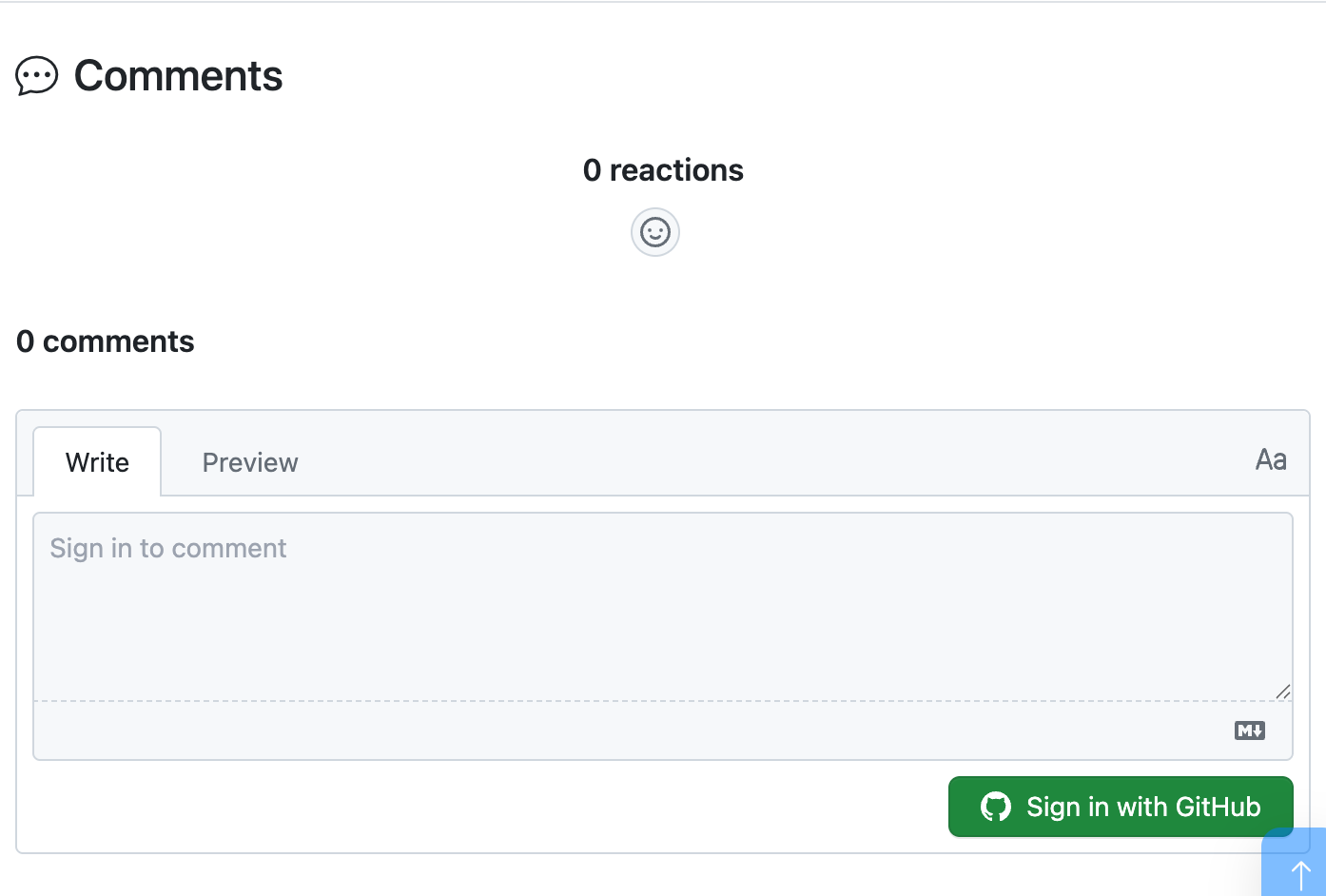
A working widget looks like this — reaction bar, comment count, a Write/Preview box and a Sign in with GitHub button:
| What renders under the "Comments" heading | Meaning |
|---|---|
| The comment box and any existing thread (above) | Fully working |
An error occurred: giscus is not installed on this repository |
The giscus app is not installed — see Troubleshooting |
An error occurred: Discussion not found |
Normal for a page nobody has commented on yet; Giscus creates the discussion on the first comment |
| Nothing at all | enabled: false, comments: false on the page, or the include isn't reached |
You will not be able to sign in and post from localhost (GitHub's OAuth redirect is bound to the deployed origin), but everything up to that point is faithful.
- Confirm the full chain — repo public, Discussions on, app installed, category valid — with one request, no browser needed:
# Replace the repo and category with your own
curl -s -G https://giscus.app/api/discussions \
  --data-urlencode "repo=bamr87/zer0-mistakes" \
  --data-urlencode "category=Announcements" \
  --data-urlencode "term=/" \
  -d "number=0&strict=true&first=1" | head -c 200
A JSON payload with a discussion key means the chain is healthy. {"error":"giscus is not installed on this repository"} means the app is missing — the config can be perfect and comments will still be broken.
Configuration Options
Data attributes
The theme's include lives at _includes/content/giscus.html. Only the first three attributes below are wired to your _config.yml; the rest are fixed in the include. To change a fixed attribute you must edit _includes/content/giscus.html directly.
| Attribute | Source | Value |
|---|---|---|
data-repo |
Config | {% raw %}{{ site.repository }}{% endraw %} |
data-repo-id |
Config | {% raw %}{{ site.giscus.data-repo-id }}{% endraw %} (required) |
data-category-id |
Config | {% raw %}{{ site.giscus.data-category-id }}{% endraw %} (required) |
data-mapping |
Fixed in include | pathname |
data-strict |
Fixed in include | 1 |
data-reactions-enabled |
Fixed in include | 1 |
data-emit-metadata |
Fixed in include | 0 |
data-input-position |
Fixed in include | top |
data-theme |
Fixed in include | preferred_color_scheme |
data-lang |
Fixed in include | en |
Theme options
The include ships with data-theme="preferred_color_scheme" (auto light/dark). To use a different theme, edit data-theme in _includes/content/giscus.html to one of:
| Value | Description |
|---|---|
preferred_color_scheme |
Auto-detect from browser settings (default) |
light |
Always light mode |
dark |
Always dark mode |
dark_dimmed |
Dimmed dark mode |
transparent_dark |
Transparent dark background |
| Custom URL | Load custom CSS theme |
Disabling comments per page
To disable comments on specific pages, add to front matter:
Building conversations with Claude Code
Because comments are GitHub Discussions, you can read, draft, and reply to them from the terminal — and Claude Code can drive the whole flow. Two pieces ship with the theme:
scripts/bin/giscus-discussions— agh-powered engine with subcommandsdoctor,categories,list,thread,draft,seed, andpost.- The
giscus-conversationskill (.github/skills/giscus-conversation/) — tells Claude Code how to read a page's thread, draft a maintainer reply with the reader's context in mind, and publish it.
# Is the whole chain healthy? (app installed, IDs match, category valid)
./scripts/bin/giscus-discussions doctor

# What categories exist (and their node IDs for _config.yml)?
./scripts/bin/giscus-discussions categories

# Which pages have comment threads?
./scripts/bin/giscus-discussions list

# Read the full conversation for a page
./scripts/bin/giscus-discussions thread --page /posts/2025/01/21/remote-work-revolution/

# Draft a reply scaffold (thread context + a REPLY section to fill in)
./scripts/bin/giscus-discussions draft --number 7 --out reply.md

# Preview, then post (writes go to public Discussions — always --dry-run first)
./scripts/bin/giscus-discussions post --number 7 --body-file reply.md --reply-to DC_xxx --dry-run
The script reads the repository from gh repo view and the category from _config.yml; override with --repo / --category-id (or the GISCUS_REPO / GISCUS_CATEGORY_ID env vars) when working against a fork. Writes (seed, post) are no-ops under --dry-run. A read-only giscus-digest.yml workflow surfaces new comment activity in the Actions job summary.
How a page maps to a discussion
With data-mapping="pathname" and data-strict="1" (both fixed in the include), Giscus finds a page's thread by matching the discussion title against the page's pathname — with the leading slash removed.
For https://zer0-mistakes.com/posts/2025/01/21/remote-work-revolution/ the widget requests:
So the discussion backing that page must be titled exactly:
not /posts/2025/01/21/remote-work-revolution/. This matters in exactly two situations:
- You seed a thread by hand. A leading slash produces a discussion Giscus
will never find — the page keeps showing an empty widget while the discussion sits in the category looking correct.
giscus-discussions seed --page /any/form/normalizes this for you; passing--titleyourself does not. - You migrate or rename discussions. Retitle to the no-leading-slash form or the mapping breaks silently.
In the normal case you never think about this: Giscus creates the discussion itself, correctly titled, the first time a visitor comments.
Migration from Disqus
If migrating from Disqus:
- Export Disqus comments (optional — for archival)
- Remove Disqus scripts from your templates
- Delete Disqus configuration from
_config.yml - Follow the installation steps above
- Note: Existing Disqus comments won't transfer to Giscus
Troubleshooting
The giscus app is not installed
The single most common way a correctly configured site still shows no comments. Every value in _config.yml can be right — repo public, Discussions on, valid IDs — and the widget will still render only this:

The giscus.app configurator reports the same thing when you type the repository in — it checks all three prerequisites at once:
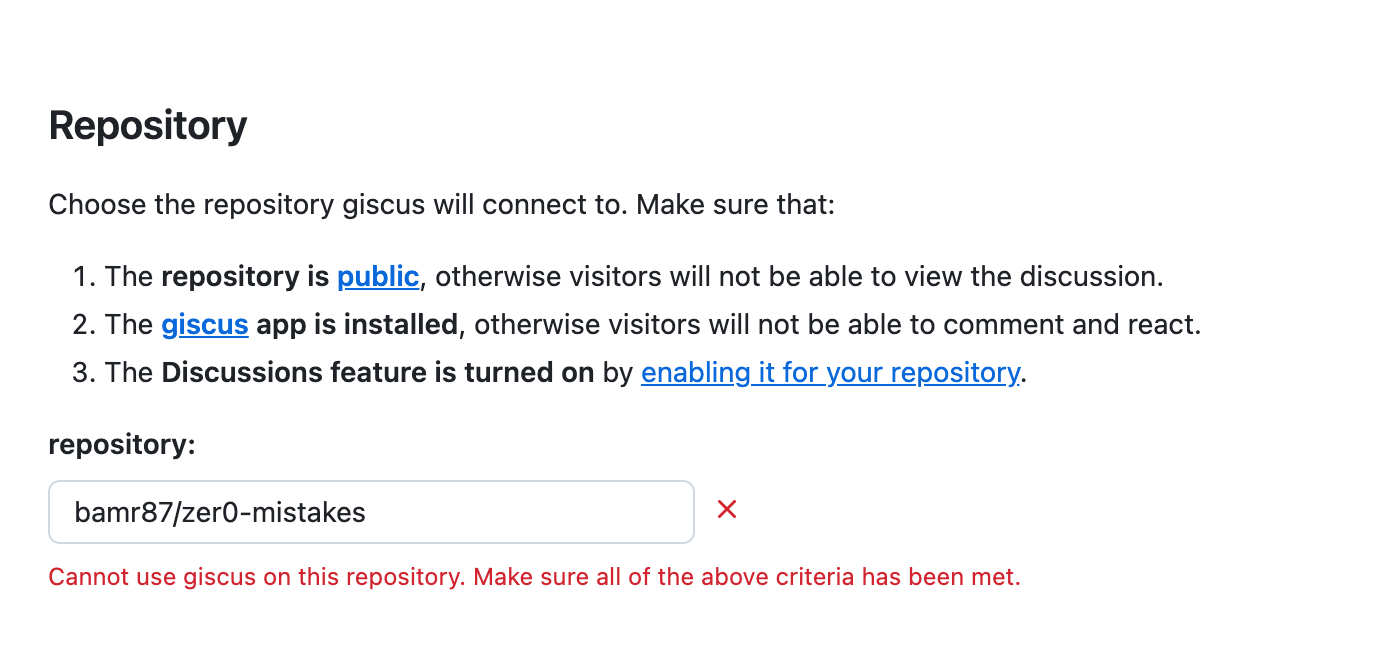
Why it happens: installing the app is a one-time action on the repository, not something any file in the repo can declare. Nothing in _config.yml, no test, and no Jekyll build can perform or detect it — so it is easy to complete every documented "configuration" step and still be missing the prerequisite. Forks are especially exposed: a fork inherits the config but not the upstream repo's app installation.
Fix: install the app at github.com/apps/giscus → Configure → select the account → grant access to the repository (either "All repositories" or "Only select repositories" including this one).
Verify without opening a browser — this is the check worth putting in your setup notes:
curl -s -G https://giscus.app/api/discussions \
  --data-urlencode "repo=OWNER/REPO" \
  --data-urlencode "category=Announcements" \
  --data-urlencode "term=/" \
  -d "number=0&strict=true&first=1" | head -c 200
{"error":"giscus is not installed on this repository"} → still missing. Any JSON with a discussion key → installed and working.
Comments Not Appearing
- Check repository visibility — must be public
- Verify Discussions are enabled on the repository
- Confirm Giscus app is installed on the repository
- Validate configuration IDs match your repository —
data-repo-idmust belong to this repo (a forked-in ID from the upstream repo will make the widget show a "repository does not match" error even though the script tag renders). Regenerate at giscus.app, or list valid category IDs with./scripts/bin/giscus-discussions categories. - Check the config key spelling — it must be
giscus:(notgisgus:); the layouts readsite.giscus.enabled. TheGiscus Comments Configurationcore test guards this.
Theme Not Matching
The include uses data-theme="preferred_color_scheme", which follows the browser's light/dark preference. To force a theme, edit data-theme in _includes/content/giscus.html:
<!-- Force a specific theme -->
data-theme="light"

<!-- Or load a custom CSS theme -->
data-theme="https://yoursite.com/giscus-custom.css"
Multiple Comment Threads
If pages are creating duplicate discussions:
- The include already ships with
data-strict="1"anddata-mapping="pathname"— confirm you haven't changed them in_includes/content/giscus.html - Verify page URLs are stable (no trailing-slash issues), since
pathnamemapping keys discussions to the URL path
Best Practices
- Pathname mapping and strict mode are on by default — the include already sets
data-mapping="pathname"anddata-strict="1", which is the most reliable setup for Jekyll sites - Create a dedicated category — keeps comments organized
- Test locally — the embedded thread won't load on localhost, but verify the
https://giscus.app/client.jsscript tag is present - Disable per page when needed — set
comments: falsein a page's front matter (works in thearticle,note, andnotebooklayouts)
Further Reading
This guide is part of the Zer0-Mistakes Jekyll Theme documentation.
See also
- [[Features]]
- [[PostHog Analytics]]